SMS add-on
An AI SMS assistant for your WordPress site
Customers text your business number and the same assistant that answers your website chat answers them, from your own knowledge base. It books a call only after they reply YES, and your team can take over by text. It runs on your own SignalWire or Twilio account.
The text agent
The same assistant, by text message
- Answers from your knowledge base, the same one chat and voice use
- Saves the lead with the sender’s phone number, and syncs to your CRM like any other lead
- Books a call only after the customer replies YES
- Every text thread shows in Conversations with an SMS badge
- A person on your team can take over by text, and hand back
- A Test mode lets you try everything with no account and no real text
Texting costs cents, works at the customer’s pace and needs no voice setup. For callers, the Phone add-on answers your number with the same assistant.
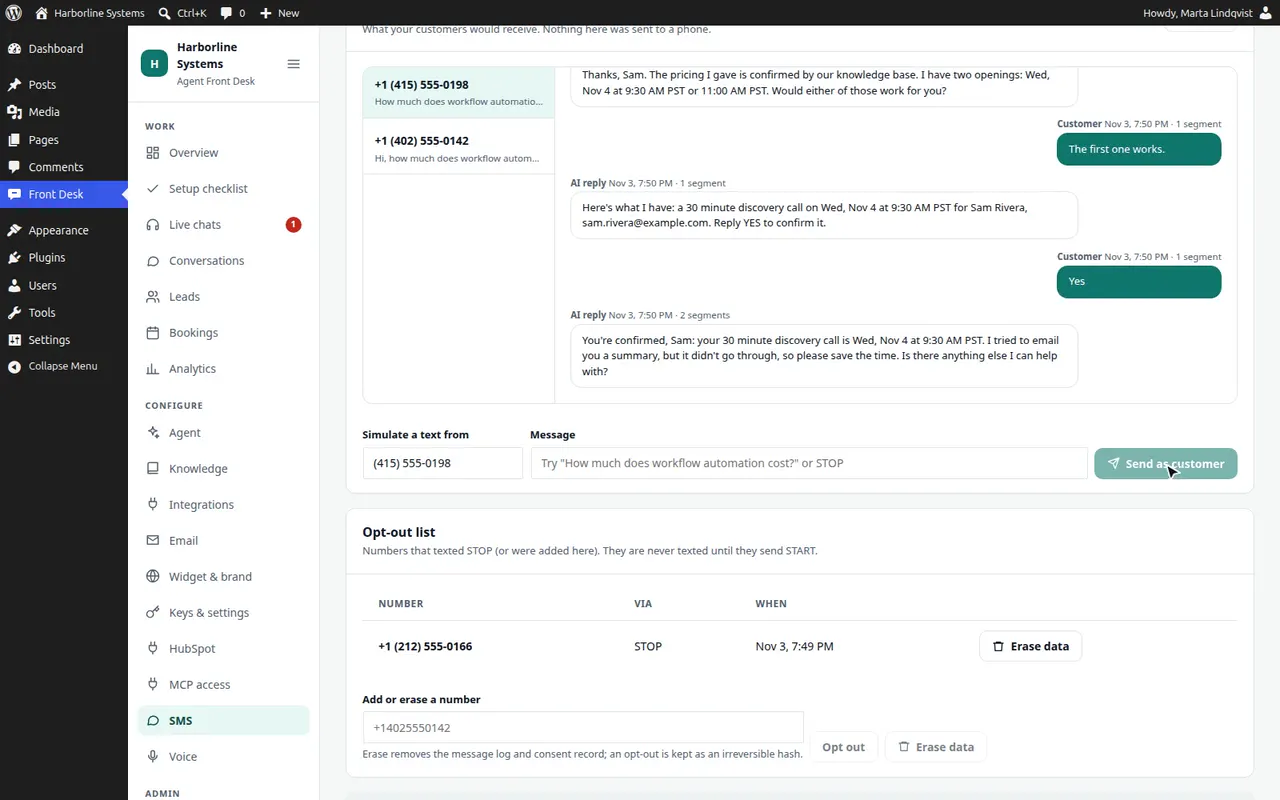
How a text conversation goes
A customer texts
They text your business number, or tap Text me instead on your site and tick a consent box. Nothing is ever sent to a number that has neither texted you nor ticked the box.
The assistant answers
The same assistant and the same knowledge base as your chat, in short plain texts. Its first reply says it is an AI and how to stop.
It qualifies and offers times
It saves the lead with the sender’s number, and offers times from your booking rules.
Booking waits for a YES
It reads the details back and asks the customer to reply YES. The server checks that the customer’s last text is an unambiguous yes and arrived after the proposal. Only then is the booking made, with the usual confirmation email.
Your team can step in
Take over from Conversations or Live chats, and your replies go out as texts from your number. The assistant stays quiet until you hand back.
Rapid-fire texts from one person are merged into one turn. If the AI service fails, the customer gets one polite note that a team member will text back, and the thread is flagged for your staff. Pictures are not read.
Two ways to start
They text you, or you offer to text them
They text your number
Their text counts as consent to be answered. The assistant’s first reply carries the AI disclosure and how to opt out.
Text me instead
The callback form on your site gets a second option: a mobile number, an optional name and an unticked consent box with your wording. The server records the time, address and exact wording, then sends the opening text. The callback form itself still works for requests your staff answer by calling back.
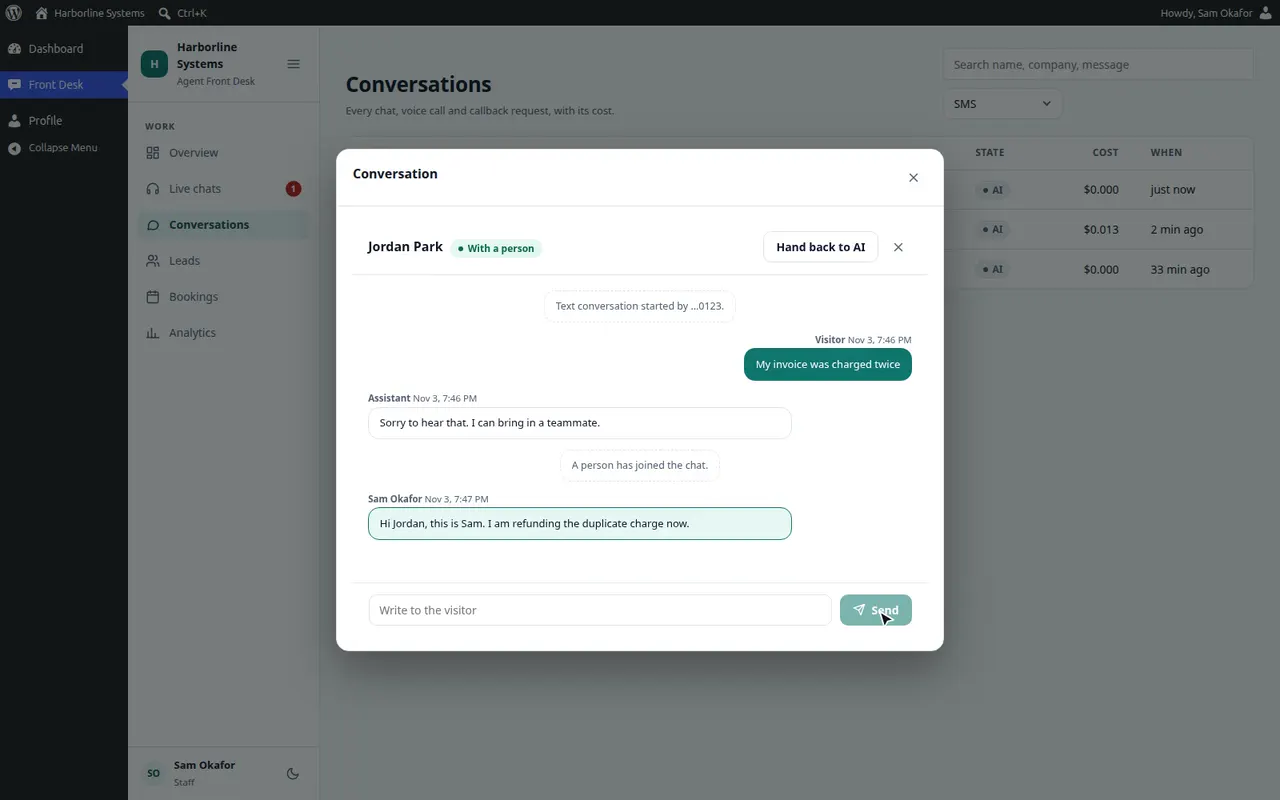
Your team can take over by text
- Press Take over in Conversations or Live chats
- Your replies are sent as texts from your business number
- The customer’s texts show for your staff in real time, and the assistant stays silent
- Hand back to the assistant when you are done
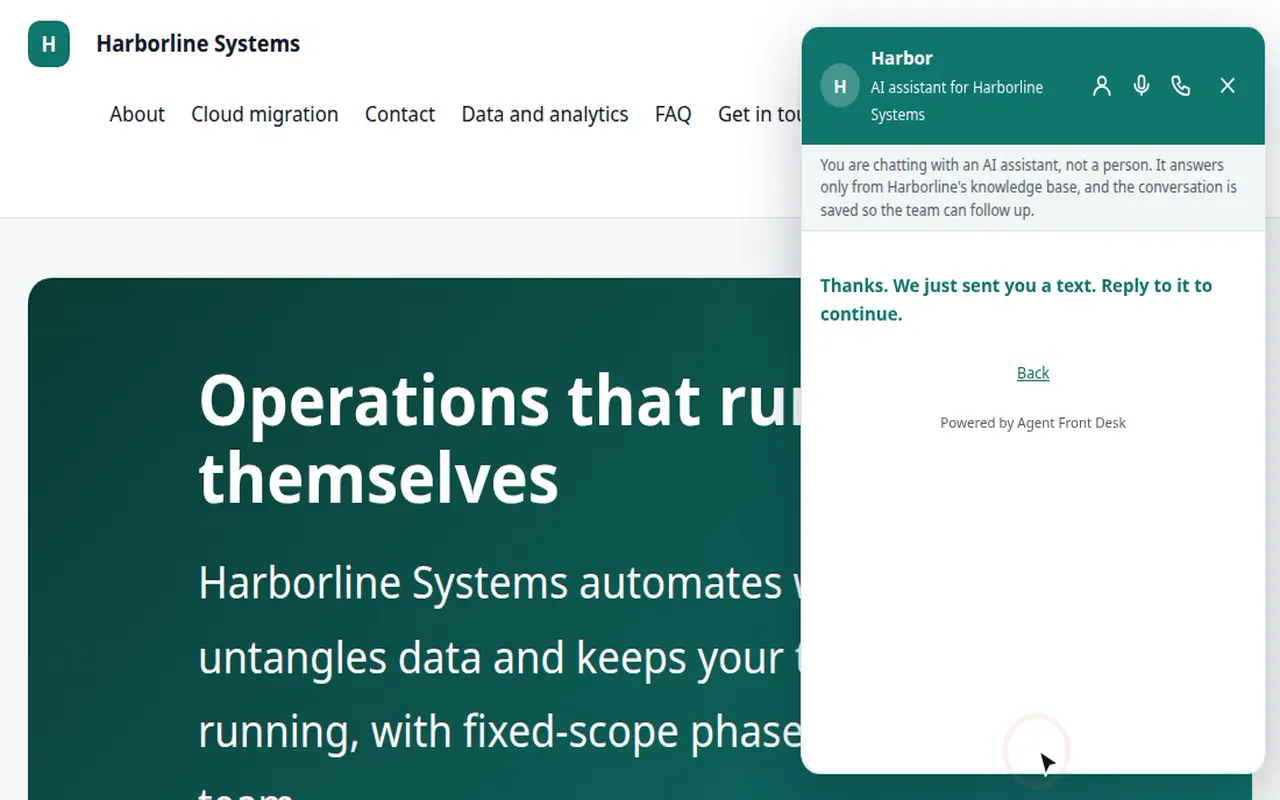
On your site
Text me instead, from the callback form
The visitor enters a mobile number and ticks the consent box, and the opening text lands in the Test inbox. Without the tick, no text is sent.
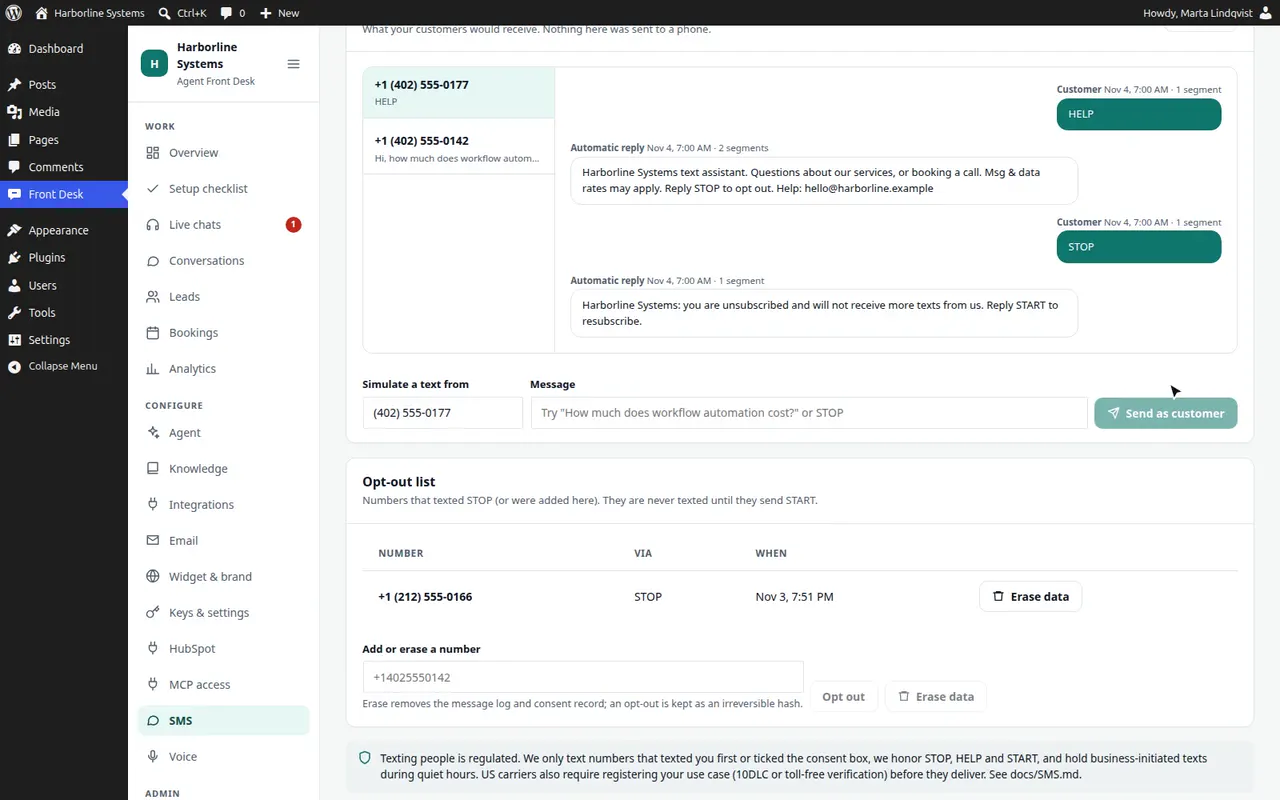
Built for the rules
Consent, opt-outs and quiet hours are handled
- Consent
- Recorded for each number: how it was given, when, from which address, and the exact wording. No consent record, no outbound text.
- STOP, HELP and START
- STOP and the usual opt-out words end all texts until the customer sends START. HELP names your business and how to reach you.
- First message
- Always says it is an AI assistant, that message and data rates may apply, and how to stop. The STOP line cannot be edited out.
- Quiet hours
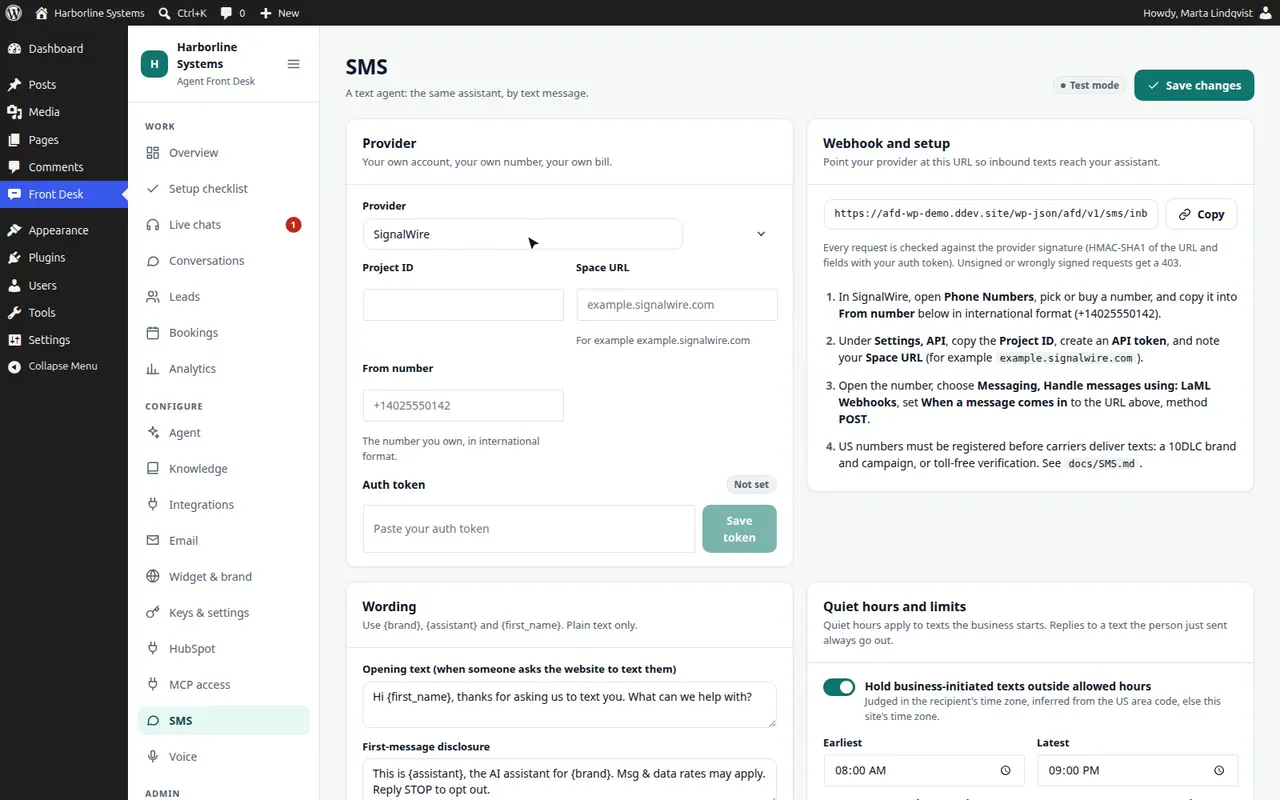
- Texts your business starts are held outside 8:00 AM to 9:00 PM in the recipient’s time zone, which is inferred from the area code. Replies to a text the customer just sent are never held.
- Rate limits
- A cap per number per hour, in both directions. Anything over is dropped and written to the audit log.
- Audit and privacy
- Consent, opt-outs, blocked and failed sends are in the audit log, with numbers shown as their last four digits. WordPress’s personal data export and erase tools cover the text log. An opt-out survives erasure as a keyed hash, so an erased number is still never texted.
This is engineering, not legal advice. Texting rules, such as the TCPA, carrier guidelines and state quiet-hour laws, depend on you and your use case. Have your lawyer approve the consent wording, which you can edit.
What you need, and the registration step
- A SignalWire or Twilio account, and an SMS-capable number
- Your own keys: the token is stored encrypted, or set in wp-config.php
- The number’s message webhook pointed at your site, with every request verified by signature
- A registered US sender: carriers block or filter business texts from unregistered numbers
Registration is required and it is per client, because it names the client’s business. Plan for days to weeks before texts flow reliably. The add-on is useful in Test mode in the meantime, so the answers can be tuned while the carriers review.
| Number | What is registered | Typical timing |
|---|---|---|
| Local 10-digit | A2P 10DLC: a brand and a campaign, with sample messages and the opt-in flow | Days to a couple of weeks |
| Toll-free | Toll-free verification: business details, use case and opt-in evidence | Days to a few weeks |
Running costs
What texting costs, paid to your provider
List prices change, so check your provider. There is no price for our service yet: during the private beta each setup is quoted per business.
Each text segment
About $0.008 to $0.01 each way, plus carrier fees on registered traffic. A segment is 160 characters, or 70 with emoji. The assistant keeps replies short and caps them at three texts.
The number
About $1 to $2 a month for a local number.
US registration
10DLC has one-time brand and campaign fees and a small monthly campaign fee. Toll-free verification usually has no fee.
The assistant
About a cent or two per exchange on your own Anthropic key. The Analytics screen shows the real cost per conversation.
Limits
What the text agent does not do
- It does not take phone calls: that is the Phone add-on. Neither one places outbound calls
- It does not read pictures sent by text
- Short codes and WhatsApp are not included
- It is built for US numbers and US carrier rules
- Delivery is up to the carriers. A registered number lowers the risk of filtering but does not remove it
- Handover and replies depend on the provider’s webhook reaching your site
Text agent questions
Can it text my customers?
Yes, with the SMS add-on. A customer texts your business number, or taps “Text me instead” on your site and ticks a consent box. The same assistant answers from your knowledge base, qualifies the lead and offers call times, and a person on your team can take over by text. It runs on your own SignalWire or Twilio account, and a Test mode sends nothing while you try it.
What does texting customers require?
A SignalWire or Twilio account and a number you own. US carriers block unregistered business texts, so each client registers a brand and campaign (10DLC) or verifies a toll-free number. Expect days to weeks, and it is done per client. The add-on handles STOP and HELP, records consent and holds quiet hours. Texting rules depend on your use case, so have your lawyer approve the consent wording.
Does it answer phone calls?
Yes, with the Phone add-on. Callers dial your own number on SignalWire or Twilio, and the same assistant that answers your website chat picks up, with the same knowledge and tools. It books a call only after the caller says yes, and every call lands in Conversations with the transcript, the recording and a call replay. It answers calls only: it never dials out.
Want your customers to be able to text you?
The private beta has limited spots, and each one is set up by hand. Tell us about your site and your CRM.