HubSpot integration
An AI receptionist that writes to your HubSpot
The HubSpot add-on connects with a private app token from your own HubSpot account. Every lead the assistant captures is synced, and you can see exactly what happened to each one.
What syncs
Contacts, notes, meetings, companies and deals
- Contacts are created or updated by email, so no duplicates
- A conversation summary and the meeting are added to the contact timeline
- The company is found or created from the work email domain
- A deal is opened in the pipeline and stage you choose when a meeting is booked
- An owner is assigned, fixed or round-robin
- Failed steps retry at 1 minute, 5 minutes, 30 minutes, 2 hours and 6 hours, or with Retry now
- A CRM problem never reaches the visitor
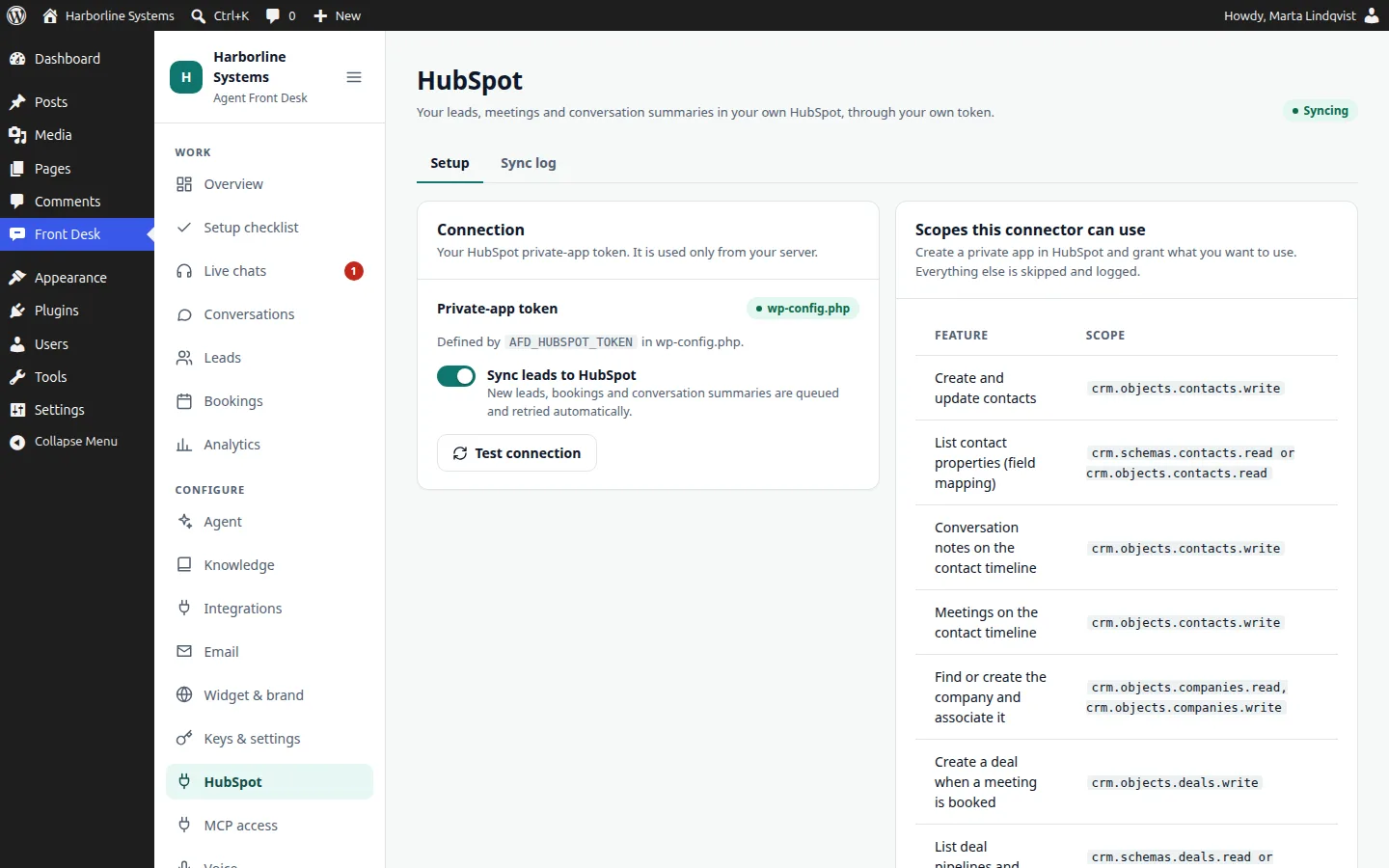
Scopes, and what happens without them
Only the first row is required. A step that lacks a scope is skipped and written to the sync log with the exact scope to add. It never fails the sync.
| Feature | Scope | Without it |
|---|---|---|
| Contacts: create or update (deduped by email), conversation notes, meetings on the timeline | crm.objects.contacts.write | Nothing syncs. This is the one required scope. |
| Field mapping from your real properties | crm.schemas.contacts.read or crm.objects.contacts.read | Default property names are used. |
| Company found or created from the work email domain and associated | crm.objects.companies.read and crm.objects.companies.write | Company and website are set as properties instead. |
| A deal when a meeting is booked | crm.objects.deals.write | No deal is created. |
| Choose the deal pipeline and stage | crm.schemas.deals.read or crm.objects.deals.read | No pipeline list to pick from. |
| Owner assignment, fixed or round-robin | crm.objects.owners.read | No owner is set. |
Setup
How we connect it
About 45 minutes, with someone who can create a private app in your HubSpot.
- 1.You create a private app in HubSpot with the scopes above.
- 2.We paste the token into wp-config.php or the HubSpot screen, and press Test connection.
- 3.We map each lead field to a property your sales team actually uses.
- 4.We pick the pipeline, stage and owners.
- 5.A test lead goes through the widget, and we check the contact, meeting and note in HubSpot, then delete the test contact.
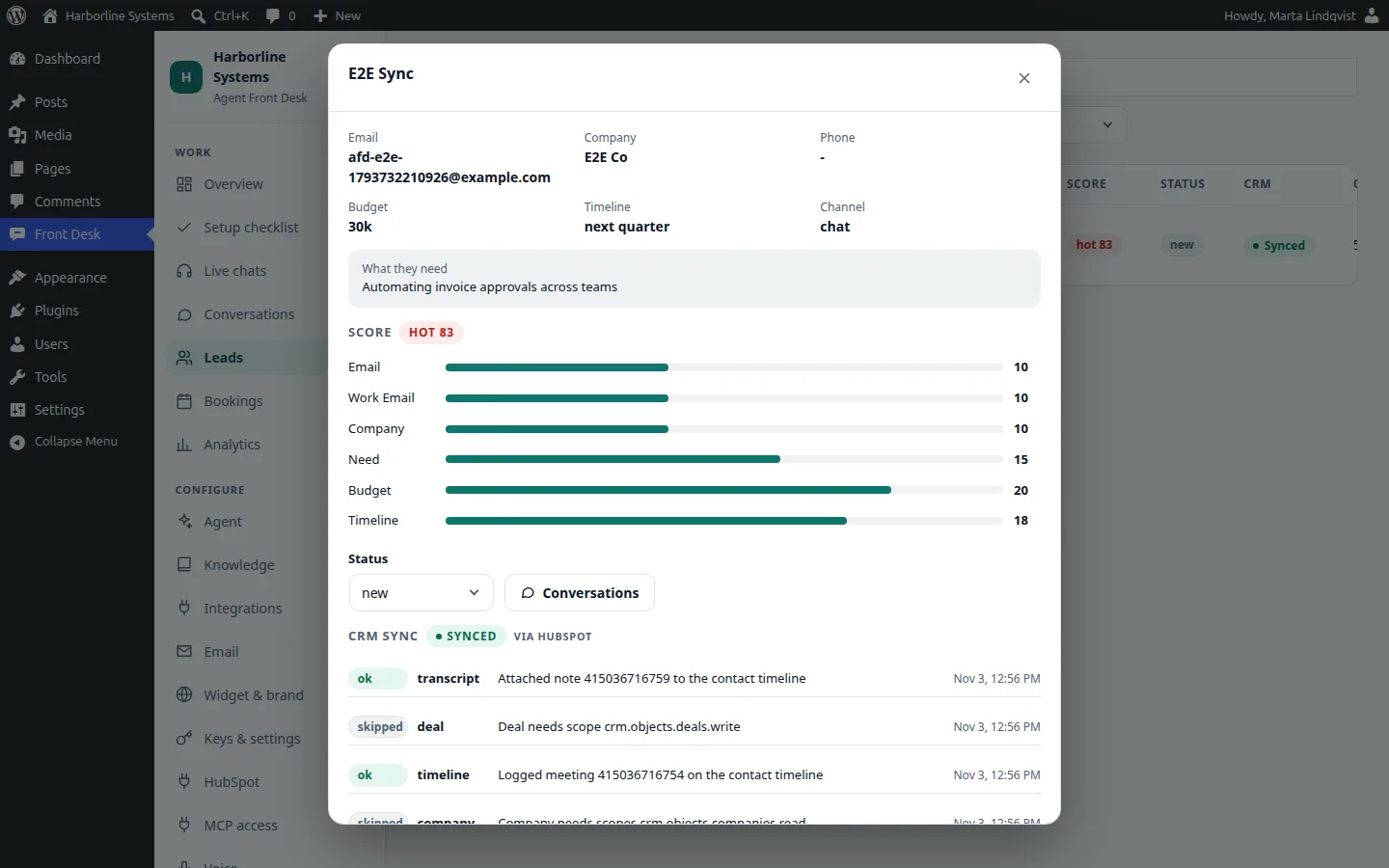
Honest note: we have tested this live against a HubSpot demo portal. Company, deal and owner steps were checked against scopes the demo token lacked, so they showed as skipped and logged. We confirm them in your portal during setup. Disconnecting HubSpot never deletes contacts.
HubSpot questions
Does an AI receptionist integrate with HubSpot?
Yes. The HubSpot add-on creates or updates contacts by email, adds notes and meetings to the timeline, and, when the scopes allow, finds or creates the company, opens a deal in the pipeline you choose and assigns an owner. A step that lacks a scope is skipped and logged with the exact scope to add.
Which CRM does it work with?
HubSpot is built in. Other CRMs are connected during the implementation, as a small plugin built on our documented connector interface. We tell you what that takes before you commit.
Will it make things up?
It is built to answer from your knowledge base and to say so when it cannot. The test playground and the gaps list show where it is weak, so you can fix content before and after launch. No AI is perfect, so review early conversations.
Want it connected to your HubSpot?
The private beta has limited spots, and each one is set up by hand. Tell us about your site and your CRM.