Phone add-on
An AI phone line for your WordPress site
Callers dial your own number and the assistant that answers your website chat picks up, with the same knowledge and the same tools. It books a call only after the caller says yes, and every call lands in WordPress with a replay. Inbound only, on your own SignalWire or Twilio account.
See it work
A real phone call books a meeting
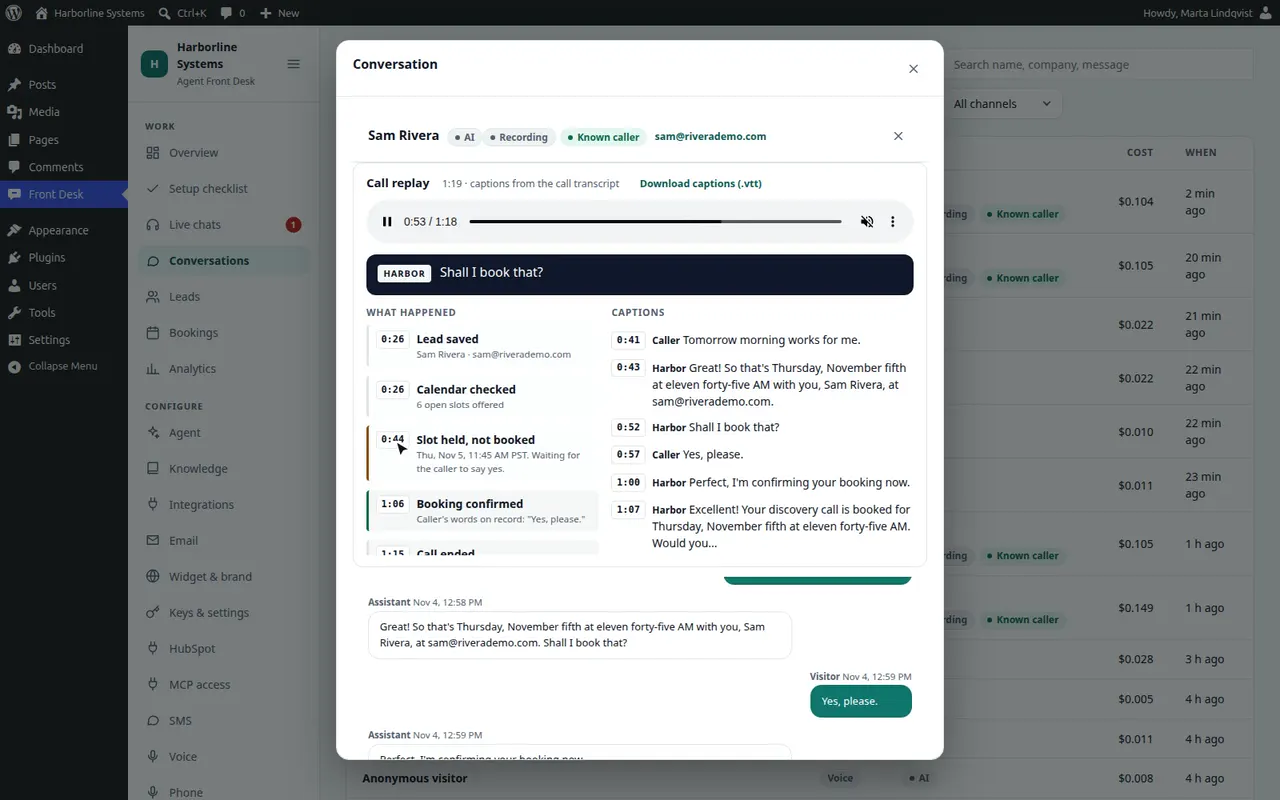
Placed over the phone network to the demo line, with a fictional client. The panel on the right shows what WordPress did, at the moment it happened.
How a call goes
Your number rings WordPress
The carrier asks your site what to do with the call. WordPress checks the kill switch, the block list, your hours and the daily and monthly limits first, so a declined call costs no assistant minutes. Then it connects the call to your phone assistant over SIP.
The assistant answers
It says it is an AI and, with recording on, that the call is recorded. Then it answers from your knowledge base, the same one your chat and browser voice use.
It qualifies and offers times
It saves the lead with the caller’s number, so a known caller is matched to their lead, and offers times from your booking rules.
Booking waits for a spoken yes
It reads the details back and asks. The server refuses the booking unless the caller’s own words are a plain yes, given after the read-back, on this call. After the call, the transcript is checked again, and a booking without a yes is flagged for your staff.
The call lands in WordPress
Conversations gets the transcript, the recording and a call replay. The lead, the meeting and the transcript sync to HubSpot like any other lead.
The tools are the same ones chat and browser voice use: search your knowledge, save and score the lead, check times, book, open a support ticket in HubSpot, or take a message for a person. Because a phone call has no browser, ElevenLabs calls your site for each one, with a secret only your site knows.
Call replay
Listen back, and see what the assistant did
- The recording, streamed through WordPress
- Captions labeled Caller and your assistant, following playback
- A timeline of what it did: lead saved, calendar checked, slot held, booking confirmed with the caller’s own words, ticket opened, handed to a person
- Press any line to play from there
- Download the captions as a WebVTT file
Timing comes from the call record ElevenLabs sends after each call, turn by turn. Calls taken before the replay existed get one the first time they are opened.
Test the line without picking up a phone
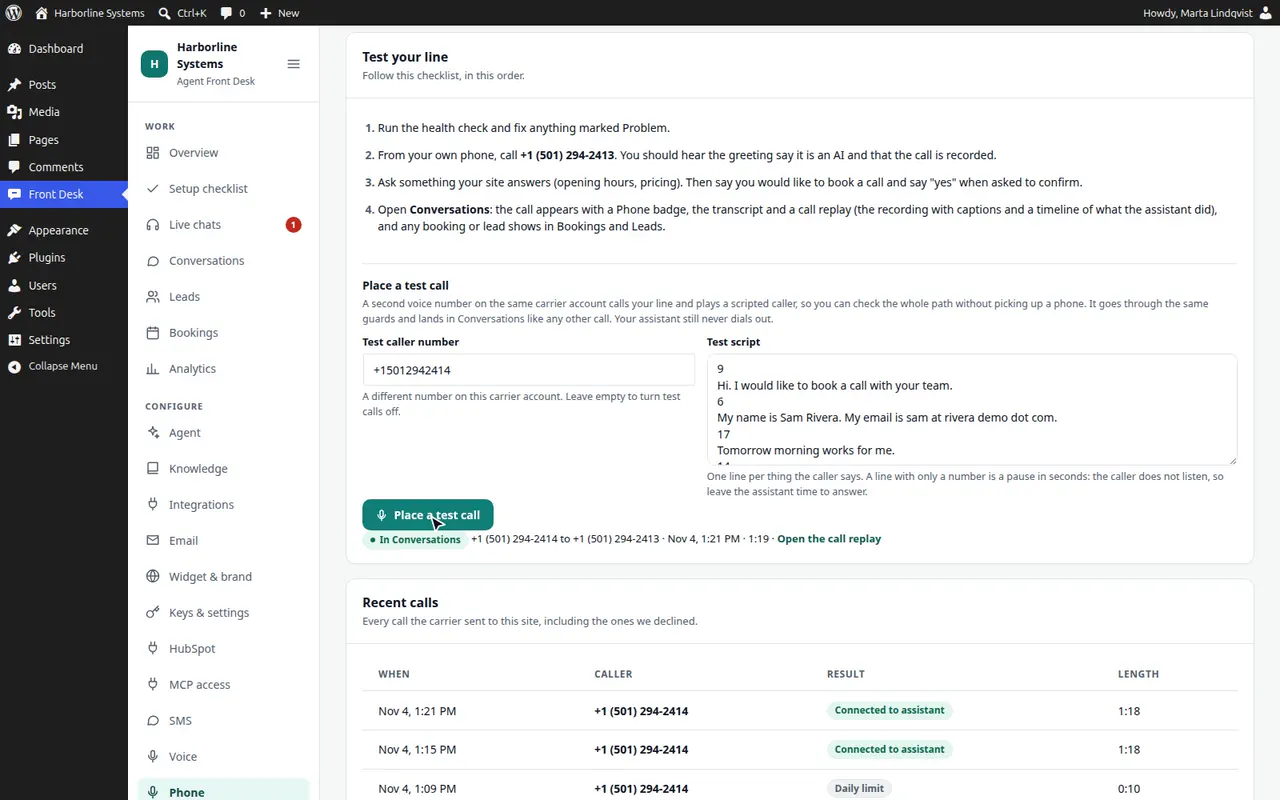
- Add a second number from the same carrier account as the test caller
- Write what the caller says, one line each, as words or a link to an audio file
- The caller listens and waits for the assistant to finish before each line
- Press Place a test call and watch it go from dialing to on the call to in Conversations
- The call takes the same path as any caller’s: guards, assistant, booking, replay
It is refused while the kill switch is on, when the monthly cap is used up, and without a second number. The call at the top of this page used the same listening caller, with a generated voice.
No booking without a yes
When the caller never says yes, nothing is booked
Another scripted call. The caller asks what a cloud migration assessment costs and gets the price from the site’s own pricing page. This was an earlier test caller on fixed timing, and the timing slips: it says goodbye instead of yes to the read-back. The slot was held and nothing was booked.
Guards
WordPress decides before a call costs anything
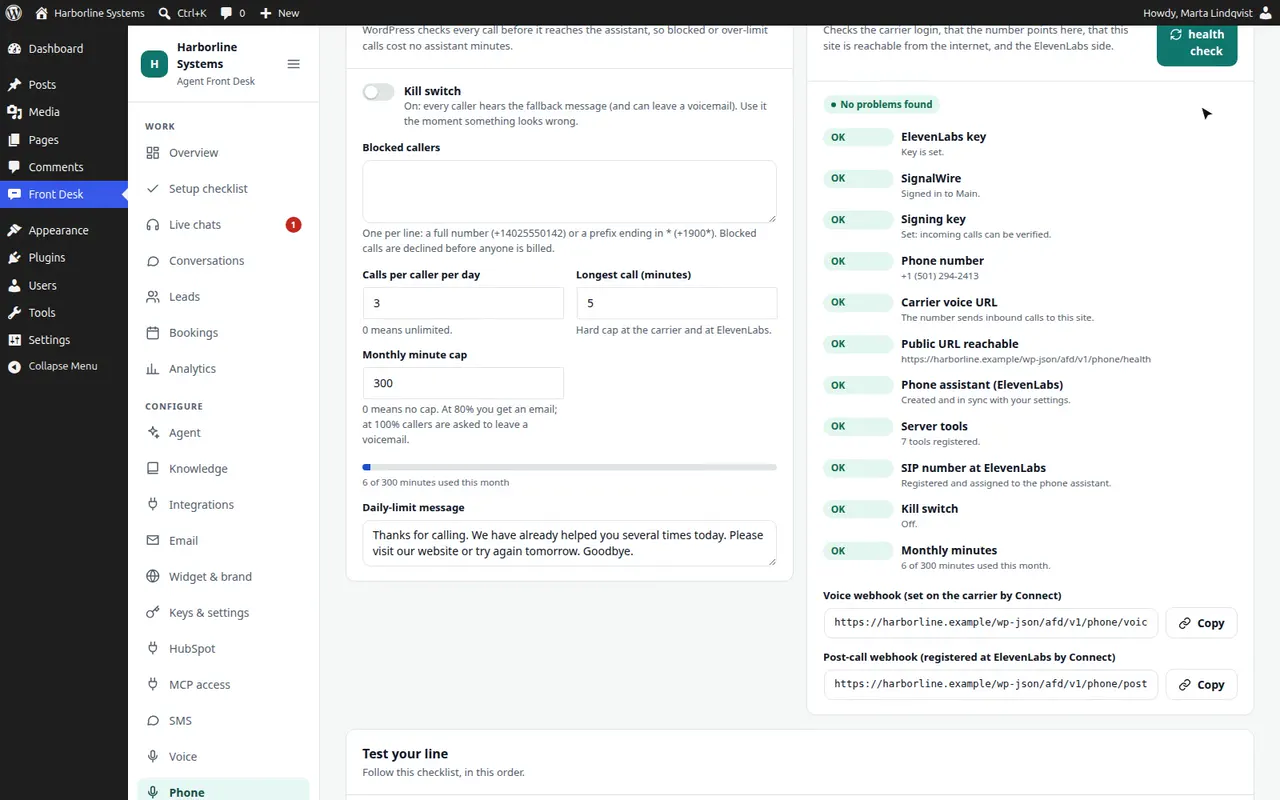
- Kill switch
- One switch and every caller hears your fallback message, with voicemail if you want it. Nothing reaches the assistant.
- Block list
- Full numbers or prefixes such as +1900*. Blocked calls are declined before anyone is billed.
- Calls per caller per day
- Three by default. Counts calls that reached the assistant, in your time zone.
- Longest call
- Five minutes by default, enforced at the carrier and at ElevenLabs.
- Monthly minute cap
- 300 minutes by default. You get an email at 80%. At 100%, callers are asked to leave a voicemail instead.
- Business hours and voicemail
- Answer around the clock, or only in your hours with an after-hours message. Voicemails land in Conversations and notify your staff.
- Signatures
- Every request from the carrier is checked against its signature, and the ElevenLabs post-call data against an HMAC. Anything else is refused.
- Recording
- On or off. Recordings stay at ElevenLabs for 30 days and play through WordPress, so your key never reaches a browser. Owners only.
What you need
- A SignalWire or Twilio account with a voice number you already own. The add-on never buys numbers
- For SignalWire, the project’s Signing Key as well as the API token. The health check flags it if it is missing
- An ElevenLabs account, the same one browser voice uses. Pay-as-you-go works
- A site the carrier can reach over HTTPS
- Optional: a second number on the same account, for test calls
Inbound calls need no carrier registration. The registration step on the text agent page is for texting only. Connect does the wiring: it creates the phone assistant at ElevenLabs, registers your number there, then points the number at your site, last, so it never rings an unready line.
What it costs to run
The carrier
Under a cent a minute for an inbound call, and about $1 to $2 a month for a local number. Twilio adds a small charge for the SIP leg.
The ElevenLabs agent
About $0.08 a minute, plus the model. A five-minute call is roughly 45 cents in all.
The cap
300 minutes a month by default, which is about $27 at those rates. Change it, or set none.
List prices change, so check your providers. You pay them directly, on your own accounts.
Limits
What the phone line does not do
- It never dials out: no callbacks, reminders or campaigns by phone. The only outbound call is your own test call, between two numbers on your account
- Transfer to a person is an option, and so is the voicemail fallback. Neither has been tested on a live call yet, so we test them with you before you rely on them
- Tested live on SignalWire. Twilio uses the same code and is covered by automated tests
- Built for US numbers
- Recording consent rules differ by place. The greeting always says the call is recorded when recording is on; checking the rules where you operate is up to you
Phone line questions
Does it answer phone calls?
Yes, with the Phone add-on. Callers dial your own number on SignalWire or Twilio, and the same assistant that answers your website chat picks up, with the same knowledge and tools. It books a call only after the caller says yes, and every call lands in Conversations with the transcript, the recording and a call replay. It answers calls only: it never dials out.
Can I listen back to a call and see what the assistant did?
Yes. Every phone call in Conversations opens with a call replay: the recording, captions labeled Caller and assistant that follow playback, and a timeline of what the assistant did, such as lead saved, slot held and booking confirmed with the caller’s own words. Press a line to play from there, or download the captions as WebVTT.
How do I test the phone line?
Press Place a test call. A second number on your own carrier account rings the line and plays a scripted caller that waits its turn, so the whole path is checked without picking up a phone: the carrier, the guards, the assistant, booking, and the call replay. A health check also tests the carrier login, the number, the public address and the ElevenLabs side.
What does an AI phone line cost to run?
You pay the vendors directly, on your own accounts. Roughly: the carrier charges under a cent a minute for an inbound call plus about $1 to $2 a month for the number, and the ElevenLabs agent about $0.08 a minute plus the model. A monthly minute cap, 300 minutes by default, stops the line before the bill surprises you.
Does it tell visitors it is an AI?
Yes. The chat opens with a plain notice, and you set the wording. Voice adds a recording notice that visitors accept before the microphone starts. On the phone, the greeting always says it is an AI and, when recording is on, that the call is recorded. The first text carries the AI disclosure and how to stop.
Want your website’s assistant to answer the phone too?
The private beta has limited spots, and each one is set up by hand. Tell us about your site and your CRM.